Property tax mistakes don't just cost money — they cost trust. Wrong rates, missing configurations, and no audit trail can turn a straightforward billing cycle into a compliance nightmare. Here's how to get your tax rules right the first time, using Estately.io.
Ask any property manager what keeps them up at night and tax configuration is almost always on the list. Whether you're managing a residential apartment block, a coworking space, or a mixed-use commercial property, the challenge is the same: different tax types, different rates, different rules — and one wrong setup can cascade into dozens of incorrect invoices.
The good news? It doesn't have to be that complicated. Estately.io's tax management module is built to give you full control over your tax structure — without needing an accountant in the room every time you onboard a new property.
The most common tax mistakes in property management
Before we walk through the solution, here are the errors that trip up property managers most often:
⚠️ Applying the wrong tax rate to a unit type
Residential and commercial units often attract different tax rates. Mixing them up means every invoice going out is potentially incorrect.
🔁 No separation between income tax and sales tax
Income tax on rent and sales tax on services are different obligations. Treating them as one leads to under-reporting or over-charging tenants.
🌍 Multi-currency without exchange rate rules
Operating across regions without locking exchange rates into the system creates financial inconsistencies that are hard to reconcile at month-end.
📋 No audit trail on tax changes
When tax rules change and there's no record of what was in place before, disputes with tenants — or regulators — become very difficult to resolve.
What Estately's tax module looks like in practice
Here's what a properly configured tax setup looks like inside Estately.io — clean, visible, and organized by name, rate, status, and creation date:
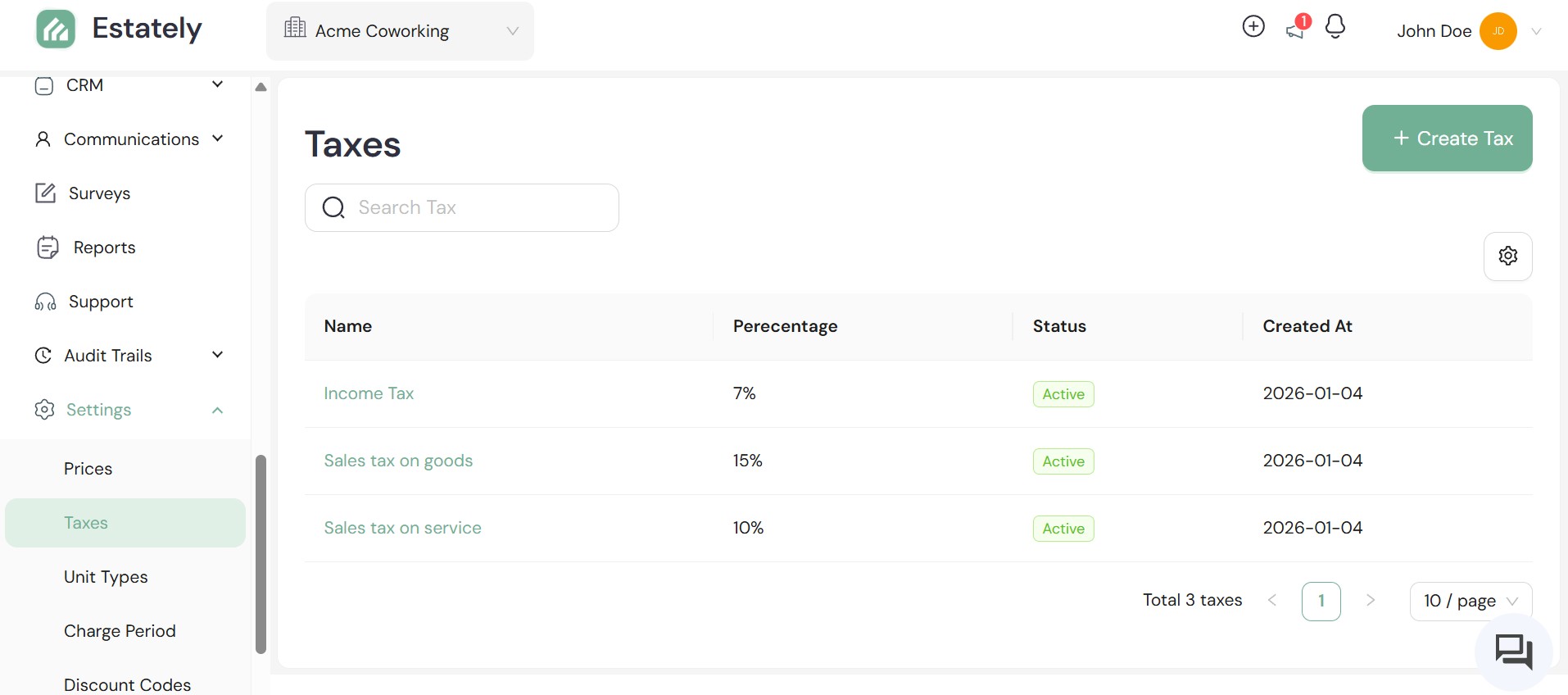
Each tax rule has a name, a defined percentage, an active/inactive status, and a creation timestamp. You can create as many rules as your portfolio requires — and assign them to specific unit types, properties, or billing cycles.
How to configure tax rules correctly — step by step
Step 1 — Audit your tax obligations first. Before touching the platform, list out every tax type that applies to your properties: income tax on rent, sales tax on services, VAT on maintenance charges, and so on. Know the rate for each.
Step 2 — Create each tax as a named rule. In Estately, navigate to your tax settings and use the "+ Create Tax" button to add each rule individually. Give it a clear, descriptive name — "Sales Tax on Service" not just "Tax 3" — so it's immediately identifiable when attached to an invoice.
Step 3 — Assign taxes at the right level. Tax rules in Estately can be applied at the property level or unit type level. Make sure commercial units are getting commercial-rate taxes and residential units are getting the correct residential rates.
Step 4 — Configure your chart of accounts to match. Each tax should map to the correct account code in your chart of accounts. This ensures that when invoices are generated, the financial reporting reflects the right tax heads — not one catch-all bucket.
Step 5 — Set up multi-currency rules if applicable. If your portfolio includes properties or tenants operating in different currencies, configure exchange rates within the platform. This prevents fluctuating rates from creating discrepancies between what was invoiced and what was received.
Once your tax rules are live and mapped correctly, every invoice generated by Estately — whether recurring rent, a one-off service charge, or an add-on billing — will automatically apply the right tax, with no manual calculation required.
What good tax management unlocks
Accurate invoicing, every time
Automated tax application means no manual rate-checking on each invoice run.
Clean financial reporting
Tax heads mapped to account codes means your reports are always audit-ready.
Multi-currency confidence
Exchange rates locked in the system keep cross-border billing consistent.
Role-protected configurations
Only authorized users can touch tax settings — no accidental overwrites.
Property tax errors are almost always a systems problem, not a people problem. When tax rules live in spreadsheets, get copied manually onto invoices, and aren't tied to any audit trail, mistakes are inevitable. Estately.io brings your entire tax configuration into one place — named, versioned, role-protected, and automatically applied to every transaction.
Getting your tax setup right from the start isn't just about compliance. It's about building a billing operation that your tenants trust and your finance team can actually manage.
Want to see how Estately handles tax setup for your property type? Book a demo now!